Creating Stunning 3D Angel Wall Art: A Guide to Multilayer Laser Cut SVG Files
In the evolving world of digital crafting and home decor, few trends have captured the imagination quite like 3D multilayered paper and wood art. This technique transforms flat materials into dimensional masterpieces, adding depth, shadow, and texture to simple designs. At the heart of this creative revolution is the Angel 3D SVG Multilayer Laser Cut File, a versatile digital asset designed for makers, hobbyists, and professional artisans alike. Whether you are looking to create a serene piece of religious wall decor, a unique holiday gift, or an intricate addition to your living space, understanding how to utilize these files can elevate your crafting projects significantly.
Understanding the Design: The Angel Mundala SVG
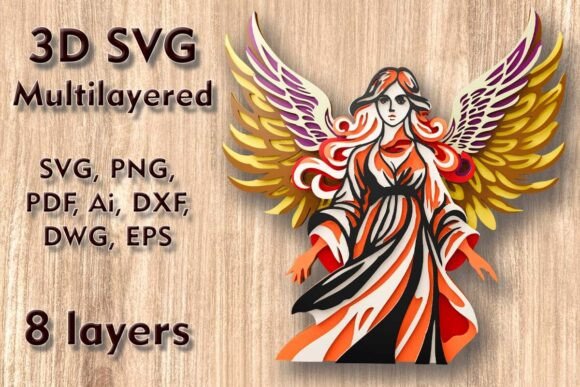
The Angel Mundala SVG is not just a single image; it is a complex, engineered design composed of 8 separate layers. When assembled correctly, these layers stack upon one another to create a striking three-dimensional effect. The term "Mundala" suggests a circular, spiritual, or meditative quality to the design, often featuring symmetrical patterns that radiate from a central figure—in this case, an angel. This specific design is tailored for various cutting machines, including Cricut, Silhouette, Glowforge, and industrial CNC routers.
The primary appeal of this design lies in its versatility. It serves as a bridge between traditional papercraft and modern laser cutting technology. By using a digital file, crafters can reproduce intricate details that would be nearly impossible to achieve by hand with scissors or knives. The result is a piece of art that looks professionally manufactured yet retains the personal touch of handmade decor.
Technical Specifications and Sizing
One of the most critical aspects of working with multilayer files is understanding the dimensions. The standard size for this Angel 3D SVG file is 250 x 250 mm (approximately 9.84 x 9.84 inches). This square format is ideal for standard framing options and fits well on most bookshelves, mantels, or wall galleries.
However, flexibility is key in digital crafting. The size of the design is easily increased if you wish to create a larger statement piece for a living room or entryway. Scaling up generally presents no issues, as the vector paths remain crisp at any resolution. Conversely, crafters must be extremely careful when reducing the design. Because the artwork consists of eight distinct layers, many elements—such as the wings, halos, or intricate background patterns—may become very thin. If you scale the image down too much, these delicate components may become too fragile to cut cleanly or may break during the weeding and assembly process. Always preview your design at the intended size before sending it to your machine.
Material Selection for Optimal Results
The beauty of the Angel 3D SVG Multilayer Laser Cutting Files is their compatibility with a wide range of materials. The choice of material drastically changes the final aesthetic of the piece. Here are the most common materials used:
- Plywood and Wood: Ideal for laser cutters and CNC machines. Wood provides a natural, warm tone and significant structural integrity. Thin plywood (3mm or 1/8 inch) is perfect for stacking layers without making the frame too heavy.
- Cardstock and Paper: Best suited for Cricut and Silhouette users. High-quality cardstock allows for vibrant colors and sharp folds. This option is more affordable and easier to assemble for beginners who do not have access to laser equipment.
- MDF (Medium-Density Fiberboard): Offers a smooth surface that takes paint well. It is denser than plywood, providing a solid feel for wall hangings.
- Acrylic: For a modern, translucent look, acrylic layers can catch light beautifully, especially if backlit. This creates a glowing effect that enhances the angelic theme.
- Cardboard and Aluminum: While less common for fine detail, sturdy cardboard can be used for prototypes or rustic looks, and thin aluminum sheets can be cut with specialized lasers for an industrial chic vibe.
When selecting your material, consider the thickness. Since there are 8 layers, the total depth of the artwork will be eight times the thickness of your chosen material. For example, using 3mm plywood will result in a piece that is 24mm deep, which requires a deep-box frame for proper display.
File Formats and Compatibility
Upon purchase, users receive a comprehensive ZIP folder containing multiple file formats to ensure compatibility with virtually any software or machine. Understanding these formats helps streamline your workflow:
- SVG (Scalable Vector Graphics): The most popular format for web-based cutting software like Cricut Design Space and Silhouette Studio. It preserves vector data, allowing for infinite scaling without loss of quality.
- Layered SVG: Specifically organized so that each of the 8 layers is on a separate layer within the file. This saves hours of manual separation time.
- DXF and DWG: Standard formats for CAD software and many CNC machines. These are essential for users operating industrial routers or plasma cutters.
- EPS and AI: Adobe Illustrator and Encapsulated PostScript files are preferred by professional graphic designers who may want to edit the vector paths before cutting.
- PNG and PDF: Useful for previewing the design, printing reference guides, or using with software that does not support vector imports.
This variety ensures that whether you are a hobbyist using a home desktop cutter or a professional running a shop with industrial equipment, the Angel 3D SVG is ready to use right out of the box.
Step-by-Step Assembly Guide
Creating your 3D Angel wall art is a rewarding process that combines precision cutting with artistic assembly. Here is a general approach to bringing the design to life:
1. Preparation and Cutting: Load your chosen material into your machine. Ensure your blade or laser lens is clean. For paper crafts, use a fine-point blade. For wood or acrylic, ensure your laser power and speed settings are calibrated for the specific material thickness. Cut all 8 layers carefully.
2. Weeding and Cleaning: Remove excess material from around the designs. For laser-cut wood, you may need to lightly sand the edges to remove char marks. For paper, use tweezers to remove small inner pieces gently.
3. Layering Strategy: Lay out all 8 layers in order. Typically, the largest background layer goes at the bottom, and the smallest, most detailed foreground layer (the angel itself) goes on top. Use spacers or foam tape between layers if you want additional depth, though the material thickness usually suffices.
4. Adhesion: Use a strong craft glue, wood glue, or double-sided adhesive tape. Apply adhesive sparingly to avoid seepage, which can stain paper or wood. Start from the center and work your way out to ensure alignment.
5. Framing: Once the glue is dry, place your 3D creation into a shadow box frame. A glass front protects the layers from dust and damage, preserving the artwork for years.
Why Choose Multilayer SVGs for Home Decor?
Incorporating Angel 3D SVG Multilayer Laser Cut Files into your home decor offers several advantages over traditional flat prints or paintings. Firstly, the texture and depth create visual interest that changes depending on the lighting and viewing angle. Shadows cast by the different layers add a dynamic element to the room, making the art feel alive.
Secondly, these projects are highly personalizable. You can choose wood stains to match your furniture, paint cardstock in nursery colors for a child’s room, or use metallic acrylics for a modern apartment. It allows the creator to infuse their personal style into a pre-designed template.
Finally, there is a profound sense of accomplishment in creating something tangible. In an increasingly digital world, the act of making physical art provides a therapeutic break from screens. Whether you are creating a gift for friends and family or upgrading your own living space, the process is as valuable as the final product.
Common Misconceptions
Many beginners assume that 3D layered art is too difficult for novices. However, with pre-separated layered SVGs, the technical heavy lifting is already done. The challenge lies mostly in patience during assembly, not in design complexity. Another misconception is that you need expensive equipment. While laser cutters produce premium results, a basic Cricut or Silhouette machine paired with cardstock can produce equally stunning results for a fraction of the cost.
Conclusion
The Angel 3D SVG Multilayer Laser Cut File represents a perfect intersection of technology and tradition. With its 8-layer design, compatible file formats, and adaptability to materials ranging from plywood to paper, it opens up a world of creative possibilities. By respecting the sizing constraints and choosing the right materials, crafters of all skill levels can produce enchanting home wall decor that captivates viewers. Unlock the magic of the season and transform your crafting projects into wonders with this high-quality, versatile design.