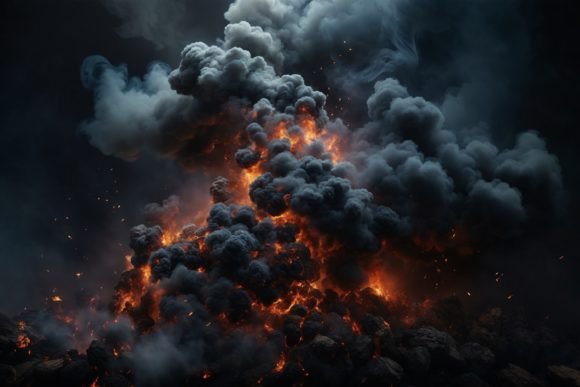
Smoke Wallpaper: Elevating Digital and Physical Designs with Atmospheric Texture
Integrating atmospheric elements into design projects can transform a flat composition into something dynamic and emotionally resonant. Smoke wallpaper and smoke backgrounds have become essential assets for creators who want to add depth, mystery, or a modern edge to their work. Whether you are designing a digital mockup, printing custom wrapping paper, or creating a backdrop for a 3D model, the right texture can define the entire aesthetic. However, many users overlook critical technical details when selecting these assets, leading to poor print quality or inefficient workflows.
This guide explores how to effectively utilize smoke textures while avoiding common pitfalls that compromise quality. By understanding resolution, color profiles, and application techniques, you can ensure your final output meets professional standards.
Understanding the Versatility of Smoke Textures
Smoke is not just a visual effect; it is a versatile design element that serves multiple functions across various media. Its organic, fluid nature makes it ideal for breaking up rigid geometric layouts. When used correctly, a high-quality smoke background can act as a subtle overlay for text, a dramatic backdrop for product photography, or a standalone artistic statement.
Creators often use these textures for:
- Digital Content: Blog backgrounds, website headers, and social media graphics where depth is needed without distracting from the main message.
- Print Media: Invitations, greeting cards, and packaging designs that require a tactile, premium feel.
- Physical Decor: Printable wallpapers and home decorations that add a moody, contemporary vibe to interior spaces.
- 3D and Mockups: Providing realistic environmental context for product renders and digital prototypes.
The key to leveraging this versatility lies in the source file. A generic, low-resolution image found via a quick search may look acceptable on a screen but will fail miserably when applied to physical products or large-format prints.
Common Mistakes When Selecting Smoke Backgrounds
Many beginners and even some experienced designers make avoidable errors when choosing smoke textures. These mistakes often stem from ignoring technical specifications or misunderstanding how digital images translate to physical media.
Ignoring Resolution and DPI Requirements
One of the most frequent errors is downloading images with insufficient resolution. A smoke background that looks crisp on a smartphone screen may appear pixelated or blurry when printed on a greeting card or used as a large wallpaper. For professional results, always check the DPI (dots per inch). Standard web images are often 72 DPI, which is inadequate for printing. You need a minimum of 300 DPI to ensure sharp edges and smooth gradients in the smoke plumes.
For example, if you are creating a printable wallpaper or a large poster, a low-resolution file will result in visible jagged lines where the smoke should be soft and ethereal. Always verify that the file dimensions meet your project’s size requirements. A resolution of 3000×2000 px at 300 DPI provides a solid foundation for most mid-sized print projects and high-definition digital displays.
Overlooking Color Profile Compatibility
Another overlooked detail is the color profile. Most digital screens use the RGB color space, while professional printers often require CMYK. Using an RGB-only file for print without proper conversion can lead to unexpected color shifts. Smoke, which often relies on subtle grays, whites, and blacks, is particularly susceptible to this issue. What appears as a cool, misty gray on your monitor might print as a muddy brown or green if the color profile is not managed correctly.
Before sending files to print, check whether your design software handles the conversion automatically or if you need to adjust the colors manually. For digital-only projects like blog backgrounds or website headers, sticking to RGB ensures vibrant and accurate display across devices.
Misusing Clipping Masks and Transparency
Smoke textures are frequently used with clipping masks to create text effects or shape-based designs. A common mistake is using a background that lacks sufficient contrast or has a busy composition. If the smoke is too dense or uneven, it can obscure the text or shape you are trying to highlight. Conversely, if the smoke is too faint, it may disappear entirely against certain backgrounds.
To avoid this, choose smoke backgrounds with clear areas of negative space. This allows you to place text or logos in the cleaner sections while using the denser smoke plumes to frame the content. Additionally, ensure the file format supports transparency if you plan to layer the smoke over other images. While JPGs are common, they do not support transparency. If you need to isolate the smoke from its background, you may need to use blending modes in your design software or seek out PNG files with transparent backgrounds.
Practical Advice for Effective Application
To maximize the impact of your smoke wallpaper or background, consider these practical steps during your design process.
- Test Scale Early: Before committing to a final design, place the smoke texture at its intended size. Zoom in to 100% to check for pixelation or artifacts. This simple step can save hours of rework later.
- Adjust Opacity and Blending Modes: Rarely will a smoke background look perfect straight out of the file. Experiment with blending modes like Screen, Multiply, or Overlay to integrate the texture seamlessly with your other design elements. Lowering the opacity can also help soften the effect, making it more subtle and sophisticated.
- Consider the End Use: If you are designing for fashion projects or packaging, think about how the texture will interact with materials. A glossy finish may reflect light differently than a matte one, affecting how the smoke’s gradients are perceived. Request proof prints when possible to evaluate the final look.
- Organize Your Assets: Keep your high-resolution files organized by theme and resolution. This makes it easier to find the right smoke texture for future projects, whether you are working on digital scrapbooking, papercraft, or 3D modeling.
What to Check Before Downloading or Buying
Before adding a smoke background to your library, perform a quick quality audit. Look for the following specifications:
- File Format: Ensure it is a JPG for general use or a PNG if transparency is required.
- Resolution: Confirm the dimensions are at least 3000×2000 px for flexibility in scaling.
- DPI: Verify it is 300 DPI for print-ready quality.
- Color Space: Check if it is RGB for digital use or if a CMYK version is available for print.
- Licensing: Ensure the license covers your intended use, whether commercial or personal.
By paying attention to these details, you avoid the frustration of discovering technical limitations after you have already built your design around a specific asset. High-quality smoke wallpaper is an investment in the professionalism of your final product. Whether you are a freelancer creating a brand identity, a hobbyist working on scrapbooking backgrounds, or a marketer designing ad creatives, the right texture enhances communication and visual appeal.
In conclusion, smoke backgrounds offer a powerful way to add atmosphere and depth to a wide range of projects. By avoiding common mistakes related to resolution, color profiles, and composition, you can ensure that your designs look polished and professional. Always prioritize high-quality sources, test your assets at full scale, and adjust blending settings to suit your specific needs. With these practices, you will be able to leverage the full potential of smoke textures in both digital and physical mediums.